Your Haryana Family ID is approved — but now what? Where do you actually get the document? How do you download it?
This is the question most families ask after their Parivar Pehchan Patra gets approved. The approval happens but nobody tells you clearly what to do next.
The good news is that family id download is completely free, takes under five minutes, and can be done right from your phone at home — no office visit, no CSC centre needed. Once downloaded you can save it, print it, and use it wherever your Family ID is required.
This guide covers everything — every method to complete your family id download step by step, what to do if the download is not working, and answers to the most common questions.
📌 Important Note: Always download your Family ID only from the official portal meraparivar.haryana.gov.in. Never share your Family ID number, OTP, or login details with anyone for any reason.
The fastest and easiest way to complete your family id download is directly through the official Mera Parivar portal. No middleman. No CSC centre visit needed. Just your phone or computer and five minutes of your time. Here is exactly what to do:
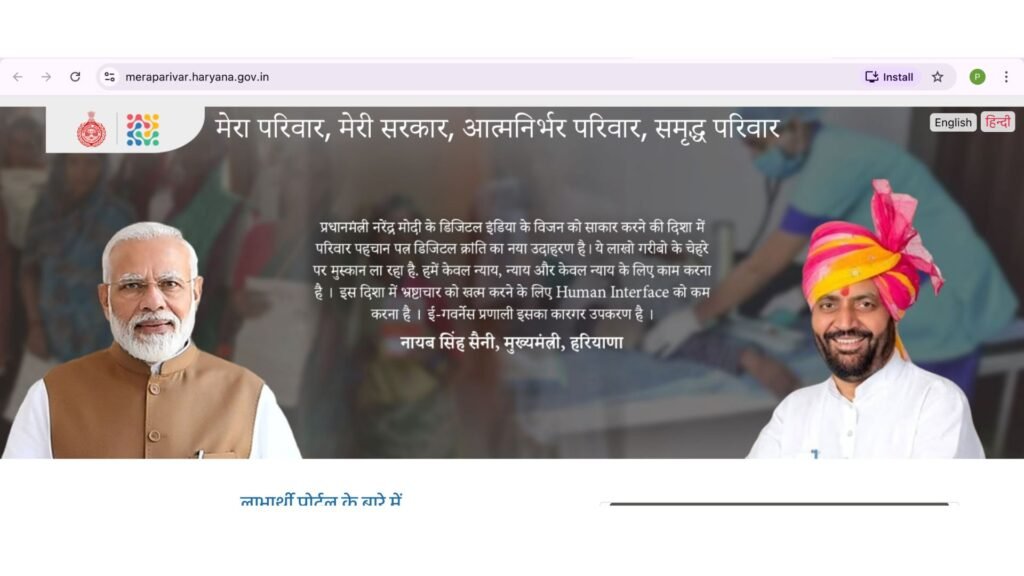
Step 1 — Open the Official Portal
Open meraparivar.haryana.gov.in on your phone or computer. Before you touch anything else look at the URL bar at the top of your screen and confirm it reads exactly as written above. Fake websites that look identical to the real one exist — one second of checking the URL protects you completely.
Step 2 — Click on Login
On the homepage find the Login button in the top menu and click on it. A small dropdown menu will appear with a few options. From that dropdown select Citizen Login and click on it to proceed.
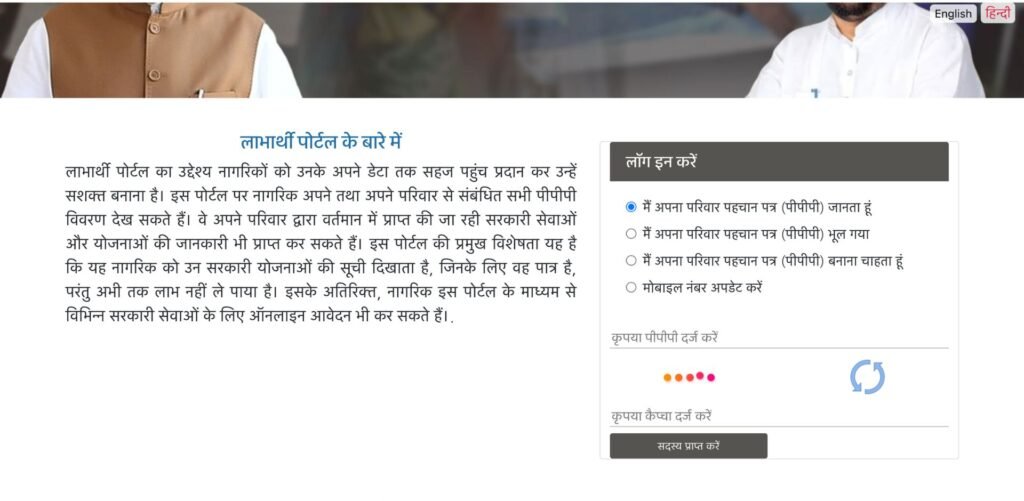
Step 3 — Enter Your Family ID Number
A login page will open asking for your Family ID. Enter your 8-digit Family ID number carefully in the field provided — one wrong digit and the login will fail. Double check the number before clicking Submit.
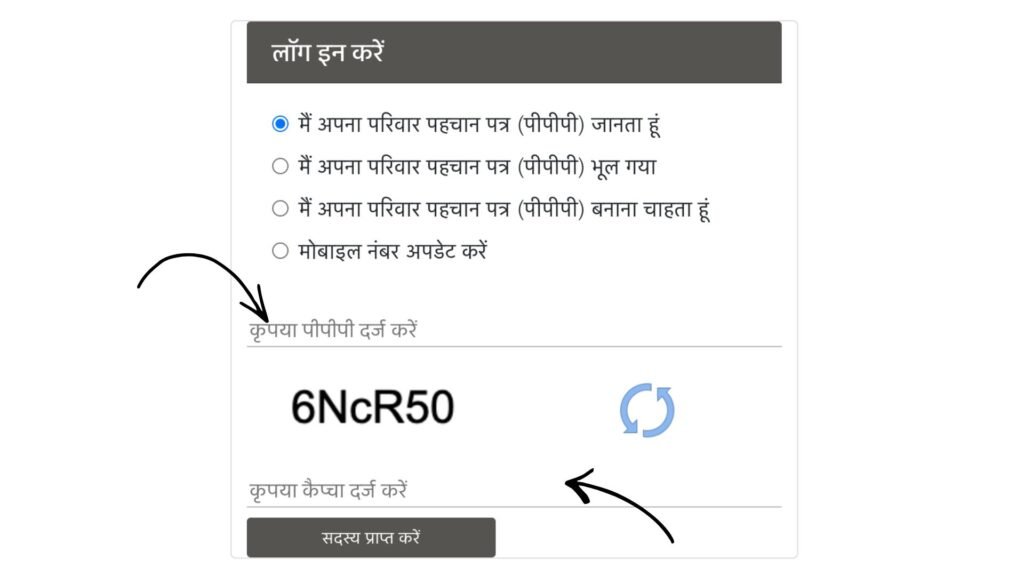
Step 4 — Verify With OTP
As soon as you submit an OTP will be sent to the mobile number that is registered with your Family ID. It usually arrives within a few seconds. Enter that OTP in the box on screen and click Verify. This confirms your identity and opens your account.
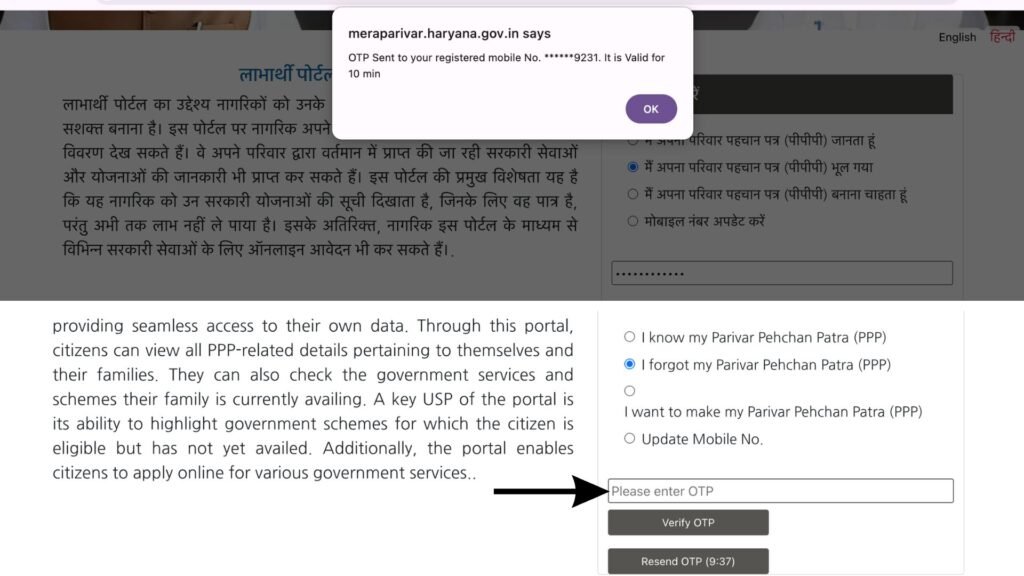
Step 5 — Find the Download Option on Your Dashboard
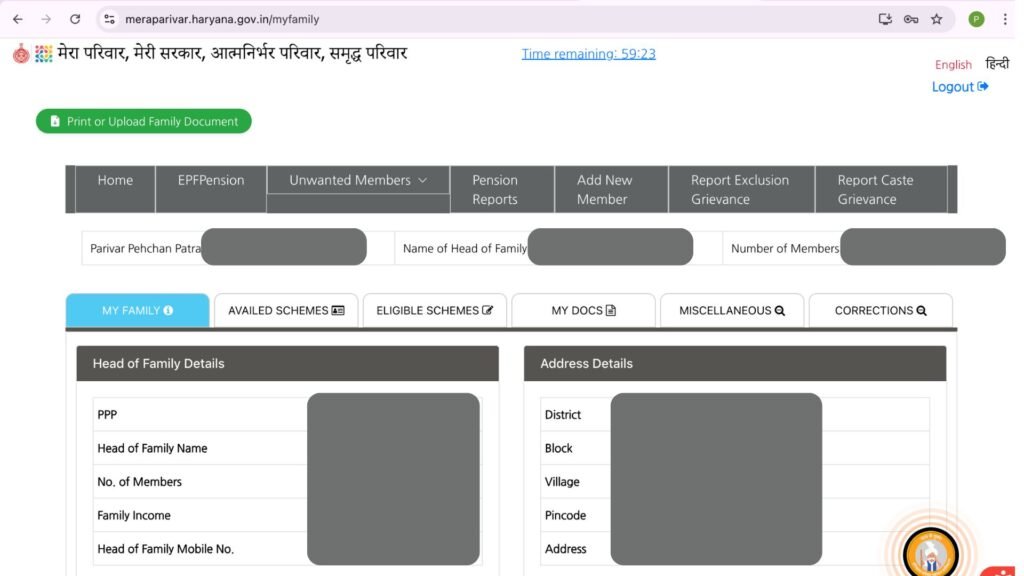
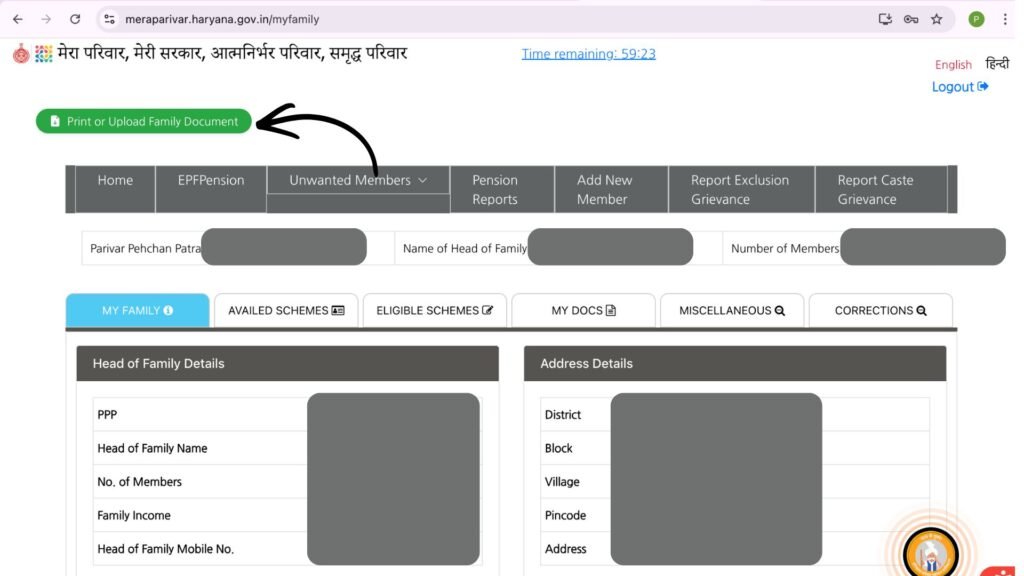
Once you are logged in your Family ID dashboard will open. Look through the options available on your dashboard for something that says Print Form or Download Family ID. It is usually clearly visible. Click on it.
Step 6 — Check Your Details and Click Download
Your complete Family ID will now appear on screen — every family member, their details, income, and all other information stored under your ID. Take a quick look through it and confirm everything appears correct. Once you are satisfied click the Download button. The system will generate a PDF file of your complete Family ID.
Step 7 — Save and Print Your Family ID
The PDF will download directly to your phone or computer within seconds. As soon as it downloads open the file and confirm it has loaded properly and all details are visible and readable. Now save it in a folder you will easily find later — something like Important Documents works well. Print at least one physical copy and keep it with your other important papers. You will need it every time any government office, scheme application, or hospital asks for your Family ID document.
What to Do If Family ID Download is Not Working
Sometimes the family id download option does not work as expected. Here is what to do in common situations:
- Download button not visible — Log out and log back in again. Sometimes a fresh login refreshes the dashboard and makes the download option visible.
- PDF not opening after download — Make sure you have a PDF reader app installed on your phone. Adobe Acrobat Reader is free and works well. Open the PDF file using the reader app.
- OTP not arriving — Check that you are entering the mobile number that is registered with your Family ID. If your registered mobile number has changed visit a CSC centre to update it first and then attempt the download again.
- Portal loading slowly or showing error — The portal sometimes experiences high traffic especially during mornings. Try again after a few hours or try using a different browser.
- Family ID showing as Pending — If your Family ID status is still Pending your download may not be available yet. Wait for your application to be fully approved and then attempt the download.
- If none of these solutions work call the helpline at 0172-3968400 — available Monday to Saturday from 8 AM to 8 PM — or email support@meraparivar.haryana.gov.in for direct assistance.
Quick Links
| Download Portal | meraparivar.haryana.gov.in |
| Citizen Corner | ppp-office.haryana.gov.in |
| Helpline | 0172-3968400 |
| Helpline Timing | Monday to Saturday 8 AM to 8 PM |
| support@meraparivar.haryana.gov.in |
Important Things to Remember
Always download your family id only from the official portals — meraparivar.haryana.gov.in or ppp-office.haryana.gov.in. Never share your Family ID number, OTP, or login password with anyone. The family id download process is completely free — never pay any website or agent for downloading your Family ID. Save the downloaded PDF in a safe location on your phone so you always have access to it. Print at least one physical copy and keep it with your other important documents. And if you face any issues call the official helpline rather than approaching unauthorised agents.
Frequently Asked Questions – Family id download
Go to meraparivar.haryana.gov.in, click Login then Citizen Login, enter your Family ID number, verify with OTP, and click on Print Form or Download Family ID on your dashboard. The PDF will download to your device immediately. The family id download process is completely free.
Yes. Go to meraparivar.haryana.gov.in, click No when asked if you have a Family ID, enter your Aadhaar number, select your name from the dropdown, verify with OTP, and click Download to complete your family id download.
Yes — completely free. Downloading your Family ID from the official portal costs absolutely nothing. Never pay any website or agent for this service.
The family id download generates a PDF file that you can save on your phone or computer and print whenever needed.
Log out and log back in to refresh your dashboard. If the button still does not appear visit your nearest CSC centre where the operator can complete your family id download for free.