This article covers everything about how to check PPP Family ID status — what the PPP Family ID is, why checking your status matters, step by step methods to check status online, what each status means, what to do if your status is stuck or rejected, and answers to the most commonly asked questions. By the time you finish reading you will know exactly how to check your PPP Family ID status without needing to search anywhere else.
Key Details
| Details | Information |
|---|---|
| Full Form | Parivar Pehchan Patra |
| Type of ID | 8-Digit Permanent Family ID |
| Temporary ID | 9-Digit Starting with T |
| Official Status Check Portal | meraparivar.haryana.gov.in |
| Citizen Corner Portal | ppp-office.haryana.gov.in |
| Processing Time | 10 to 30 Days |
| Status Check Cost | Completely Free |
| Helpline Number | 0172-3968400 |
| Helpline Timing | Monday to Saturday 8 AM to 8 PM |
| Email Support | support@meraparivar.haryana.gov.in |
Table of Contents
Method 1 - Check PPP Family ID Status Through the Official Portal
The fastest and most direct way to check PPP Family ID status is through the official Mera Parivar portal:
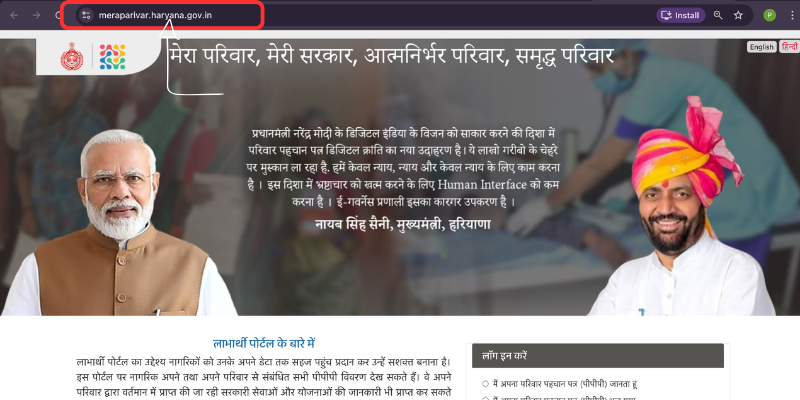
Step 1:-
Open meraparivar.haryana.gov.in on your phone or computer. Before typing anything take one second to confirm the URL is exactly right. That one check keeps you completely safe from fake websites.
Step 2:-
On the homepage look for the Status Check option. It is usually clearly visible on the main navigation. Click on it.
Step 3:-
The portal will ask you to identify your application. You can enter any one of these — your Family ID number, your application reference number, or your registered mobile number. Use whichever you have saved and available.
Step 4:
If you entered your mobile number an OTP will arrive on that number within a few seconds. Enter it in the box provided to verify your identity.
Step 5:
Your current PPP Family ID status will appear on screen immediately. You can see exactly where your application stands right now.
Method 2 — Check Status Through Citizen Login
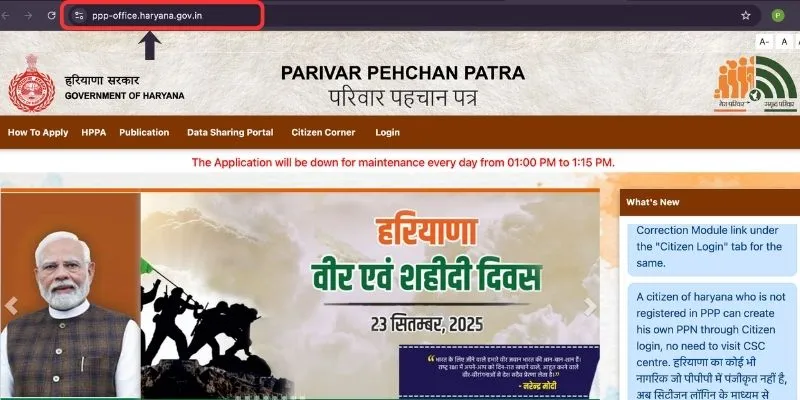
Step 1 — Go to ppp-office.haryana.gov.in on your phone or computer.
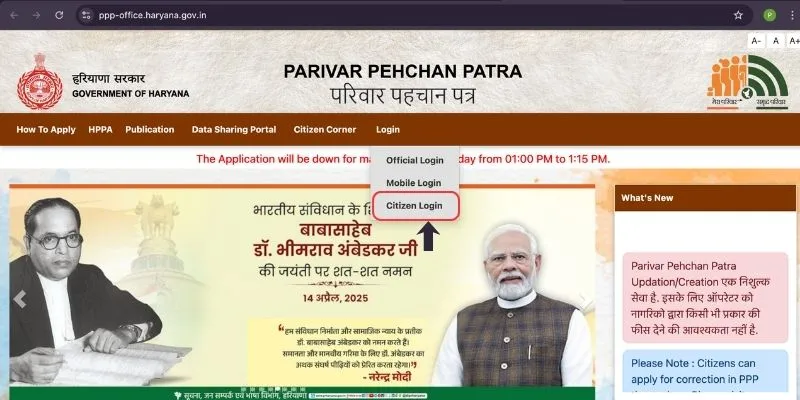
Step 2 — Click on Citizen Login on the homepage
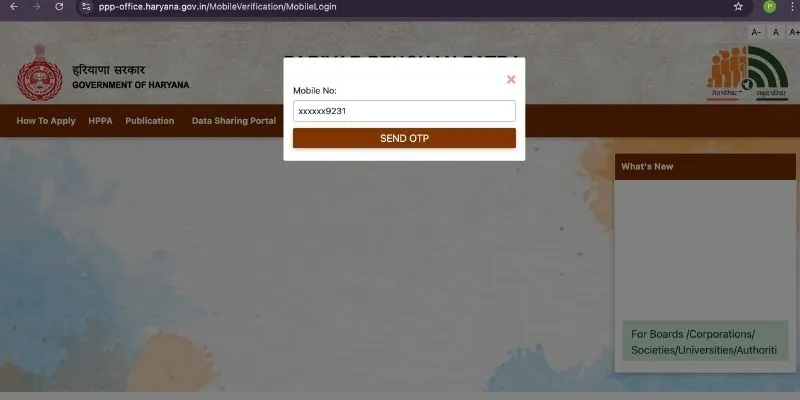
Step 3 — Enter your registered mobile number and verify your identity through the OTP that arrives on your phone.
Step 4 — Once you are logged in your complete dashboard will open showing your Family ID details and the current status of your application — including any pending updates or actions required from your side.
Method 3 — Check Status Using Your Aadhaar Number
Do not remember your Family ID number or application reference number? That is completely fine. You can still check PPP Family ID status using just your Aadhaar number
Step 1 — Go to meraparivar.haryana.gov.in
Step 2 — Look for the option that says search by Aadhaar and click on it
Step 3 — Enter your Aadhaar number carefully and click Fetch Family Data
Step 4 — A dropdown list will appear — select your name from it.
Step 5 — Click Send OTP and enter the OTP that arrives on your registered mobile number
Step 6 — After verification your Family ID details and current status will appear on screen completely
Method 4 — Check Status Offline at a CSC Centre
Not comfortable navigating online portals on your own? That is completely understandable. Just walk into your nearest CSC centre and let the staff do it for you:
Step 1 — Visit your nearest Common Service Centre CSC, Saral Kendra, or Atal Seva Kendra in your area.
Step 2 — Tell the staff clearly that you want to check your PPP Family ID status. They handle this regularly and know exactly what to do.
Step 3 — Hand them your registered mobile number, Aadhaar number, or application reference number — whichever you have available.
Step 4 — The operator will check your PPP Family ID status on the official portal right in front of you and tell you exactly where your application currently stands and whether anything needs your attention.
This service is completely free at every CSC centre across Haryana. If any operator asks you to pay for simply checking your status — that is not right. Walk away and visit a different centre.
Quick Links
| Contact | Details |
|---|---|
| Official Status Portal | meraparivar.haryana.gov.in |
| Citizen Corner | ppp-office.haryana.gov.in |
| Helpline Number | 0172-3968400 |
| Helpline Timing | Monday to Saturday 8 AM to 8 PM |
| support@meraparivar.haryana.gov.in |
What Does Each Status Mean?
After checking your PPP Family ID status you will see one of the following statuses. Here is what each one means and what you should do:
- Under Review or Processing — Your application has been received and is currently being verified by the authorities. This is normal and expected. Processing typically takes 10 to 30 days. If it has been less than 30 days give it more time and check again after a week.
- Approved — Your PPP Family ID has been successfully verified and activated. Your Family ID is now live and linked to the government scheme database. You can now use it to access all connected government benefits and schemes.
- On Hold — There is a specific issue with your application — usually a document mismatch, missing information, or a detail that needs correction. Log in to the portal immediately, check what the issue is, and upload the correct or missing document to get your application moving again.
- Rejected — Your application was reviewed and not approved. Check the reason clearly — it will be mentioned against the rejection. Visit your nearest CSC centre or Saral Kendra for help in resubmitting a corrected application.
What to Do If Status is Stuck for More Than 30 Days
If you check your PPP Family ID status and it has been showing Processing or Under Review for more than 30 days without any change here is what to do:
Visit your nearest Saral Kendra or CSC centre and tell them your application has been stuck for over 30 days. They can check the specific reason and help you resolve it. You can also call the official PPP helpline at 0172-3968400 — available Monday to Saturday from 8 AM to 8 PM. Or email your query to support@meraparivar.haryana.gov.in with your application reference number and registered mobile number.
F&Qs
Go to meraparivar.haryana.gov.in, click on Status Check, enter your Family ID number, application reference number, or registered mobile number, verify with OTP, and your current PPP Family ID status will appear immediately. The process is completely free and takes under two minutes.
Processing and verification of a new PPP Family ID application typically takes 10 to 30 days. If your status has not changed for more than 30 days visit your nearest Saral Kendra or call the helpline at 0172-3968400 for assistance.
If everything looks correct on your end and the status is still not moving, just visit your nearest CSC center or Saral Kendra with your Aadhaar card. The operator there will check your application, find out what is causing the delay, and tell you exactly what needs to be done. Honestly that one visit can save you weeks of unnecessary waiting.
On Hold means there is a specific issue with your application — usually a document problem or information mismatch. Log in to the portal, check what the specific issue is, and upload the correct document or make the required correction immediately.
Yes. Go to meraparivar.haryana.gov.in, select the option to search by Aadhaar, enter your Aadhaar number, verify with OTP, and your Family ID details and current status will appear.
Yes — completely free. Checking your PPP Family ID status online through the official portal or offline through a CSC centre costs absolutely nothing. Never pay anyone for this service.