This article covers everything in one place about family id registration Haryana — what the Family ID is, why it matters, who is eligible, what documents are required, the complete step by step online registration process, the offline registration method through CSC centres, what happens after registration, and answers to the most common questions. By the time you finish reading you will know exactly how to complete your family id registration without any confusion.
📌 Important Note: Always download your Family ID only from the official portal meraparivar.haryana.gov.in. Never share your Family ID number, OTP, or login details with anyone for any reason.
| Full Name | Parivar Pehchan Patra PPP |
| Permanent Family ID | 8 Digits |
| Temporary Family ID | 9 Digits Starting with T |
| Launch Year | January 2019 |
| Registration Cost | Completely Free |
| Online Portal | meraparivar.haryana.gov.in |
| Citizen Login Portal | ppp-office.haryana.gov.in |
| Processing Time | 10 to 30 Days |
| Families Covered | Around 54 Lakh Families |
| Helpline | 0172-3968400 |
| Helpline Timing | Monday to Saturday 8 AM to 8 PM |
| support@meraparivar.haryana.gov.in |
Documents Required
Keep these documents ready before starting your family id registration:
For the Head of Family:
- Aadhaar Card — mandatory and most important
- Mobile number linked to Aadhaar — OTP verification happens on this number
For Every Family Member:
- Aadhaar Card
- Age Proof — birth certificate, school certificate, voter ID, or matriculation certificate
- Proof of marital status — marriage certificate if applicable
- Income proof — salary slip, income certificate, or self-declaration
Additional Documents:
- Residence proof confirming Haryana domicile
- Any other documents specific to individual family members
How to Register Online — Step by Step
Family id registration online is completely free and can be done from your phone. Here is the complete process:
Step 1 — Open meraparivar.haryana.gov.in on your phone or computer. Before entering anything confirm the URL is exactly right. That one check keeps you safe from fake websites.
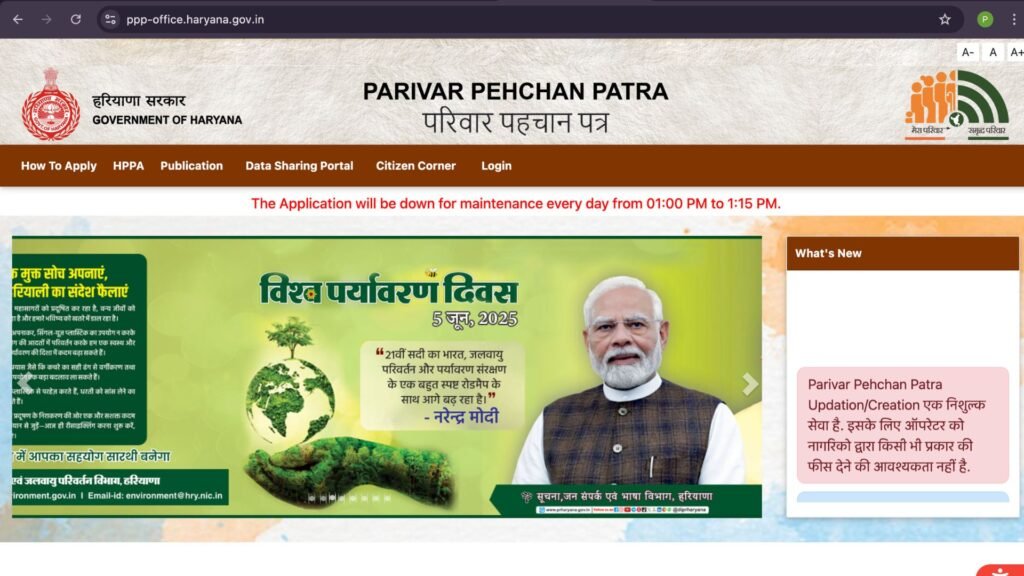
Step 2 — On the homepage click on Login from the main menu. A dropdown will appear — select Citizen Login.
Step 3 — A login page will open. When asked if you have a Family ID select No to create a new one. This will take you to the new family id registration form.
Step 4 — Enter the Aadhaar number of the head of the family carefully. An OTP will be sent to the mobile number linked with that Aadhaar. Enter the OTP to verify identity.
Step 5 — After Aadhaar verification the system will automatically fetch basic details of the head of family from the Aadhaar database — name, date of birth, and address. Confirm these details are correct.
Step 6 — Now fill in the remaining required details for the head of family — name in Hindi, complete date of birth with proof document selected, occupation, income, marital status, and any other fields the form asks for. Fill every field carefully and match details exactly with your documents.
Step 7 — Add all other family members one by one. For each member enter their Aadhaar number, verify with OTP, and fill in their individual details — name, age, relation to head of family, occupation, income, education, and marital status. Repeat this for every family member.
Step 8 — After adding all family members review the complete form one final time. Check every detail for every member. Once completely satisfied click Submit.
Step 9 — After successful submission a temporary Family ID number starting with T will appear on screen. Save it immediately — screenshot it or write it down. This temporary ID is your reference number while the permanent 8-digit ID is being processed and verified.
How to Register Offline — Through CSC Centre
Not comfortable with the online process? You can complete your family id registration offline at your nearest CSC centre:
Step 1 — Visit your nearest Common Service Centre CSC, Saral Kendra, or Atal Seva Kendra in your area.
Step 2 — Tell the operator you want to do a new family id registration for your family.
Step 3 — Carry all required documents — Aadhaar cards of all family members, age proof, income proof, and any other relevant documents. The operator will enter all details on the official portal on your behalf.
Step 4 — Verify all the details the operator enters carefully before they submit. Make sure every family member’s name, age, and details are entered correctly.
Step 5 — After submission collect the acknowledgement receipt with your temporary Family ID reference number. Keep it safely. This service is completely free at CSC centres — never pay any operator for registration.
Quick Links
| Registration Portal | meraparivar.haryana.gov.in |
| Citizen Login | ppp-office.haryana.gov.in |
| Helpline | 0172-3968400 |
| Helpline Timing | Monday to Saturday 8 AM to 8 PM |
| support@meraparivar.haryana.gov.in |
What Happens After Registration?
After your family id registration is submitted the government verifies all the documents and details you provided. This verification process typically takes 10 to 30 days.
Once verification is complete your temporary 9-digit Family ID is converted into a permanent 8-digit Family ID. You will receive a notification on your registered mobile number when the permanent ID is ready.
After the permanent Family ID is generated you can log in to meraparivar.haryana.gov.in and download your Family ID as a PDF. You can then print it and use it for all government scheme applications.
If your application is put on hold due to a document issue a notification will be sent to your registered mobile number. Log in to the portal and upload the correct document to resolve the issue.
Application Status Check
After completing family id registration check your status after 7 to 15 days:
- Go to meraparivar.haryana.gov.in
- Click on Status Check
- Enter your temporary Family ID or registered mobile number
- Verify with OTP
- Your current status will appear on screen
Status meanings:
- Under Review — Being verified. Give it more time
- Approved — Permanent Family ID generated. Download it now
- On Hold — Document issue. Upload correct document immediately
- Rejected — Check reason and visit nearest CSC centre for help
Frequently Asked Questions
Family id registration in Haryana is the process of creating a Parivar Pehchan Patra — a unique 8-digit Family ID issued by the Government of Haryana to every family. It is the single most important document for accessing more than 500 government schemes and benefits in Haryana. Registration is completely free at meraparivar.haryana.gov.in.
Yes — completely free. Family id registration online through the official portal or offline through a CSC centre costs absolutely nothing. Never pay any website, agent, or CSC operator for registration.
After submitting your family id registration the verification process takes 10 to 30 days. You receive a temporary ID immediately after submission and the permanent 8-digit ID is issued after successful verification.
Aadhaar card is mandatory for family id registration in Haryana. Every family member whose details are to be added must have a valid Aadhaar card. Get Aadhaar made first and then proceed with registration.
If your family already has a Family ID do not register again — it will be rejected as a duplicate. Instead log in to the existing Family ID and update any details that need to be changed or add new family members through the update process.