If you live in Haryana and your Family ID has wrong or old details, this guide will help you. Updating your Family ID online may sound difficult, but it is actually very easy.
You can add a new family member, remove a name, or update income details from your phone or computer. Even if you have never used a government website before, you can still follow the steps easily.
By the end, you will understand what to do, which documents are needed, and how to update your Family ID without any mistakes.
📌 Important Note: Always download your Family ID only from the official portal meraparivar.haryana.gov.in. Never share your Family ID number, OTP, or login details with anyone for any reason.
| Full Name | Parivar Pehchaan Patra (PPP) |
| Also Known As | Family ID Haryana |
| Launched By | Haryana Government |
| Launch Year | 2020 |
| Unique ID Digits | 8-Digit Unique Family ID Number |
| Official Portal | meraparivar.haryana.gov.in |
| Purpose | Single ID for all government schemes & benefits |
| Linked With | Aadhar, Ration Card, Income Records |
| Update Mode | Online + Offline (CSC / Atal Seva Kendra) |
| Who Needs It | Every permanent family in Haryana |
| Data Covered | Name, Age, Income, Occupation, Marital Status |
| Update Required When | Birth, Death, Marriage, Income & Address Change |
| Key Benefits | Pension, Ration, Scholarship, Job Schemes & more |
| Helpline Number | 1800-2000-023 (Toll Free) |
Before we get into the how, let us first talk about the what. A lot of people are not even sure what kinds of changes they can make through the Family ID update Haryana Online portal — and that confusion stops them from even trying. So let us clear that up right now.
- Add a new family member — A baby just arrived? A daughter-in-law joined the family after marriage? Any new dependent can be added to your Family ID without much hassle.
- Remove a deceased member — Losing someone is already painful. Updating the record with a death certificate ensures their name is removed with dignity and your family data stays clean.
- Correct income details — Got a new job? Lost one? Your financial situation changes and your Family ID should reflect that honestly.
- Fix name spelling errors — A small typo in a name can cause big problems later. Get it corrected before it creates trouble in any scheme application.
- Update your mobile number — This one is more important than people realize. Every OTP, every alert comes to that number. If it is wrong, you are locked out of everything.
- Change your address — Shifted to a new area within Haryana? Update it so your records match your current reality.
- Update marital status — After a marriage or divorce, this detail needs to reflect the truth.
I know government processes can feel overwhelming sometimes. You open a portal and suddenly there are ten different options staring at you and you have no idea where to even begin. So let me just walk you through this the way I would explain it to my own family member — step by step, no stress.
Open your phone or laptop and go to meraparivar.haryana.gov.in. That is it. That is the only website you need for Family ID update Haryana Online. If anyone — online or offline — is asking you to pay money just to access this, please do not fall for it. The portal is completely free to use.
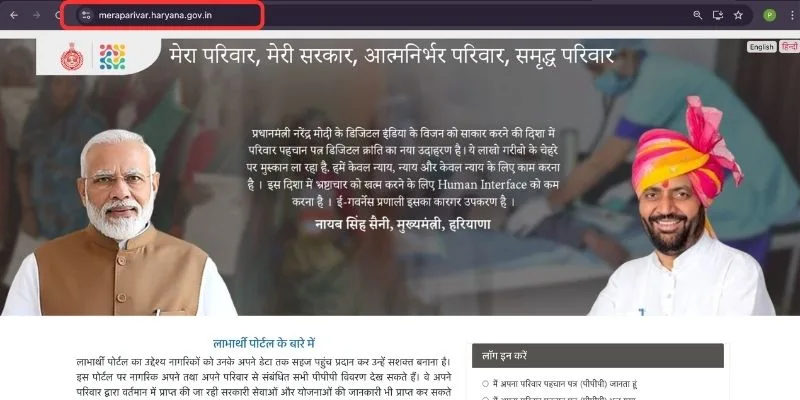
On the homepage you will see a Login button. Click it. Enter your Family ID number and wait for the OTP to come on your mobile. Enter the OTP and you are inside your account. Nothing complicated about this part at all.
Once you are logged in, your whole family’s information will show up on the screen. Take a moment to look at it. Now find the option that says “Update Family Details” or “Edit Member.” Click on whichever section needs fixing. The portal is laid out quite simply — you will find it easily.
This is the most important step so please do not rush through it. If you are adding a new family member, keep their Aadhar card handy before you start. If you are correcting income details, have your salary slip or income certificate ready. Whatever change you are making, the portal will tell you exactly which documents to upload. Just read each instruction on screen and follow it calmly.
Once you have filled everything in and uploaded the right documents, go ahead and hit submit. From here, your request moves to the Block or District office for verification. Some updates — like a mobile number change — get approved really fast. Others that involve documents might take anywhere from a few days to a couple of weeks. Just keep checking the portal for your status update. No need to panic or keep calling anyone.
The moment your update gets approved, log back into the portal. You will be able to download your updated Family ID right there. Take a printout, keep one copy at home and one saved on your phone. And honestly — that is all there is to it. Your entire Family ID update Haryana Online is done sitting right where you are, without visiting a single government office.
| Official Family ID Portal | meraparivar.haryana.gov.in |
| Login / Update Family ID | meraparivar.haryana.gov.in/login |
| Register New Family ID | meraparivar.haryana.gov.in/register |
| Check Application Status | meraparivar.haryana.gov.in/status |
| Download Family ID | meraparivar.haryana.gov.in/download |
| Find Nearest CSC Center | locator.csccloud.in |
| Aadhar Update Portal | myaadhaar.uidai.gov.in |
| Haryana Government Official Site | haryana.gov.in |
| Helpline Number | 1800-2000-023 (Toll Free) |
| Email Support | ppp-haryana@gov.in |
Not everyone is comfortable doing this online, and that’s completely fine. The government has set up Atal Seva Kendras and Common Service Centres (CSCs) across Haryana where trained operators will help you complete the Family ID update Haryana Online process on your behalf. There is a nominal service charge for using CSC services, usually between ₹10 to ₹50 depending on the type of update.
You can also go to your Gram Sachiv (village secretary) if you live in a rural area. They are authorized to help residents with Family ID update Haryana Online requests and verify documents at the grassroots level.
Honestly, timelines vary. Simple changes like mobile number updates or adding a newborn with matching Aadhar data can be approved within 24–72 hours. More complex updates like income correction or removing a deceased member may take 7–15 working days, especially if physical document verification is required. The Family ID update Haryana Online portal does give you a tracking option so you’re never completely in the dark.
Doing a PPP update online is actually pretty simple once you know the steps. Just open the official Haryana PPP portal at meraparivar.haryana.gov.in, click on Citizen Login, and enter your Family ID or any linked Aadhaar number. After OTP verification you will land on your family dashboard where all your current details are displayed. Find the specific detail that needs changing, click edit, fill in the correct information, upload any required documents, and hit submit. That is genuinely all there is to it. The whole thing can be done from your phone without stepping out of your house.
It honestly depends on what you are trying to change. Different updates need different documents so here is a quick breakdown to make things easier for you.
If you are correcting a name, your Aadhaar card with the right spelling is what you need. Fixing a wrong date of birth? A birth certificate or Aadhaar card will do the job. Updating income details requires a fresh government issued income certificate. For an address change, any valid address proof works, your Aadhaar card or a utility bill for example. Adding a new baby to the family needs their birth certificate. Adding someone after marriage needs the marriage certificate. And if you are removing a member who has passed away, a death certificate will be required.
Our advice is to get clear photos or scans of all relevant documents ready before you even start your PPP update. That way the process moves smoothly without any unnecessary interruptions halfway through.
There is no one size fits all answer here because every case is a little different. A straightforward name correction can sometimes get cleared within just a few days. Something more involved like an income update or adding a new family member usually takes a week or two because there is more to verify on the government's end.
For most people the family ID update gets approved somewhere between a few days and two weeks. But if you have been waiting for more than three weeks and your dashboard is still showing no change, do not just keep waiting. Head to your nearest CSC center or Saral Kendra and ask them to check what is going on. They will find out what is holding it up and tell you what needs to happen next.
Take a breath first because a rejection is really not as bad as it sounds. It does not mean your request has been turned down permanently. It just means something needs to be corrected before it can go through.
Most rejections happen for pretty simple reasons. Maybe the details you entered do not match the document you uploaded. Maybe the photo of your document was too blurry to read clearly. Maybe you uploaded the wrong type of document for that particular change. Or maybe a field was accidentally left empty before submitting.
Just go back, figure out which of these caused the problem, fix it, and resubmit your family ID update. Honestly most people get it approved on the second attempt once the issue is sorted out properly.
Absolutely yes. Not a single rupee needs to be paid for submitting a PPP update request through the official government portal. The entire family ID update process is completely free of charge.
So if anyone, whether online or showing up in person, tells you that you need to pay some amount to get your update processed or approved, please do not believe them. That is simply not true and anyone asking for money is either trying to mislead you or running an outright scam. The only investment this process requires from you is a little bit of your time. Nothing else.